Wider
Full screen, on the front screen.
Launching October 23rd
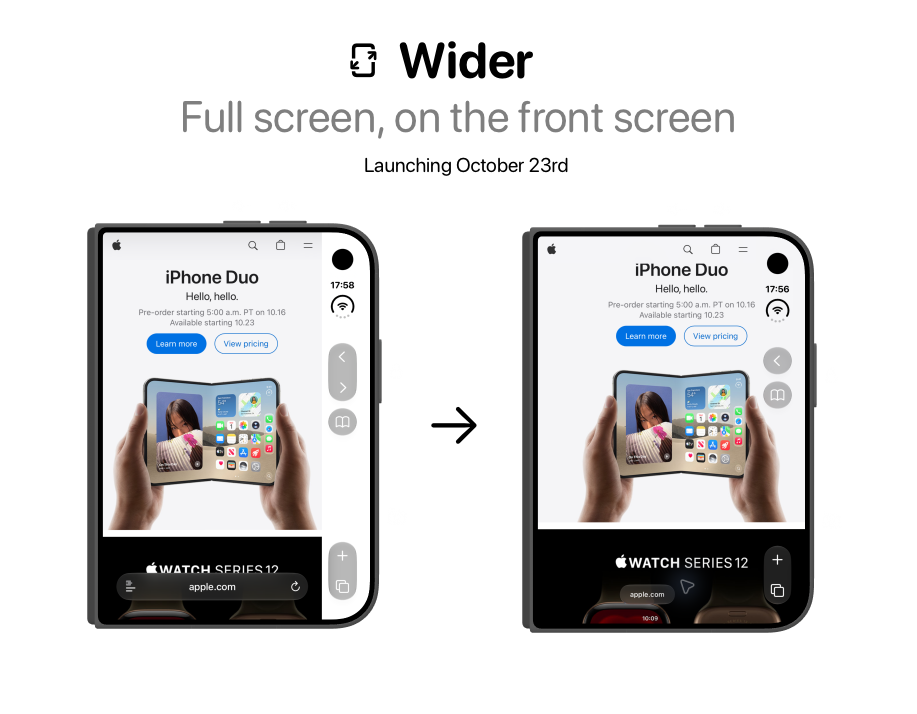
A little more room for the web.
Keep using Safari. Let your websites use more of your screen.
Launching October 23rd
A few things to know.
What does Wider do?
Wider is a Safari extension that gives websites more room on your iPhone Duo’s front screen. It lets page content extend into the space beside Safari’s controls, as shown above.
How do I turn it on?
Install Wider, then enable it in Settings → Apps → Safari → Extensions. Open a website in Safari and allow Wider access from the extensions menu. Reload pages you already had open.
Does it work on every website?
Results depend on the website. Some pages expand neatly; others have fixed headers or their own layout limits. You can adjust Wider for each website or turn it off for a page that looks better without it.
Can I switch back to the original view?
Yes. Tap Wider’s ↔ button on the webpage to turn the extra space off or on. You can also change the setting from Wider in Safari’s extensions menu. Your choice is saved for that website.
Does Wider collect my browsing data?
No. Wider keeps your browsing activity on your device. If you choose to report a website manually through the app, only that website’s URL is shared. Read our privacy policy.